Meet Quinn. The estimator that learns your shop.
Quinn drafts quotes from a description or a drawing, turns RFQ emails into draft quotes, checks every quote before it goes out, and gets sharper as your team clocks real hours. You stay in charge the whole way.
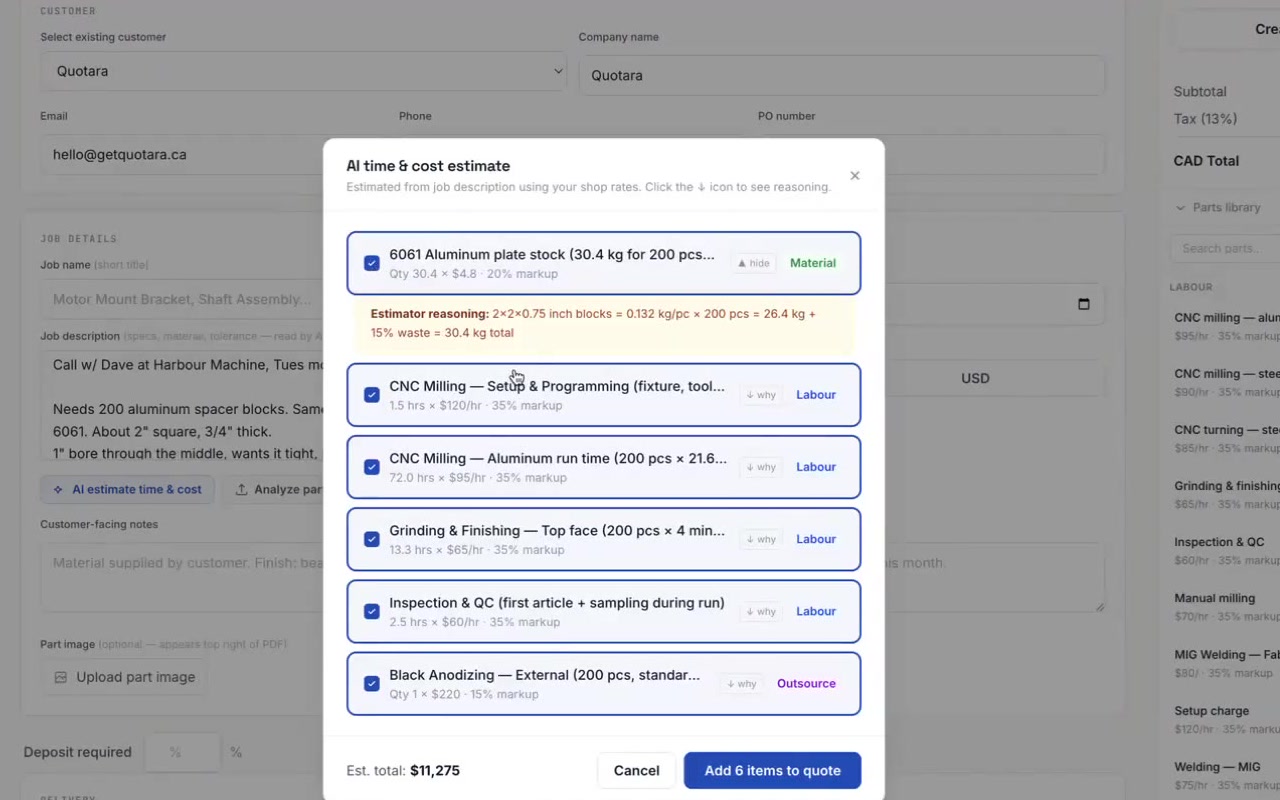
Drafts a quote from a description
Type the job the way the customer described it. Quinn works out programming, setup, cycle time per piece, material with cutoff, and outside work like anodizing or heat treat, then prices every line from your own rates.
- Setup charged once, run time per piece
- Each line comes with Quinn’s reasoning
- Matches lines to parts in your library
| Line | Qty | Rate |
|---|---|---|
| Programming, new part | 1.0 h | $95 |
| CNC milling, setup | 1.5 h | $95 |
| CNC milling, run (50 × 9 min) | 7.5 h | $95 |
| 6061-T6 bar, incl. cutoff | 14 ft | $7.40 |
| Clear anodize | 1 lot | $180 |
Reads your drawings
Upload the PDF drawing or a photo of it, up to 10 files for one job. Quinn reads dimensions, tolerances, material callouts, the title block and finish notes, and returns one set of lines for the whole job.
- Several sheets read together, not line by line
- Tells you the complexity it sees
- With STEP or DXF files, says plainly it is estimating from the name
Turns RFQ emails into draft quotes
Forward RFQs to your shop’s own Quotara address, by hand or with a Gmail or Outlook rule. Quinn reads the email and any attached drawings, pulls out the customer, quantities, material and dates, and leaves a draft quote waiting for you.
- Works while you’re on the floor
- You get an email when the draft is ready
- Every RFQ kept in one inbox, converted or not
Checks every quote before it goes out
Quinn looks over each quote for the things that cost a shop money later, and tells you before the customer sees it.
- Lines with no rate, a missing customer email
- Tight tolerances and hard materials like titanium or Inconel
- Outside work or big jobs with no delivery date or PO
Learns from the hours you actually clock
When a job ships, Quotara compares the hours you quoted with the hours your team clocked. Once 3 jobs have shipped, Quinn shows that history next to new estimates and uses it in its drafts. It never changes a price on its own.
- History by part, or across all your jobs
- One click to use it, one click to ignore it
- Extreme jobs are capped so one disaster can’t skew your pricing
Answers questions, in English or French
Stuck on a screen? Ask Quinn inside Quotara and get an answer in your shop’s language. If Quinn isn’t sure, it says so and offers to send your question to Andrew, the founder.
- Built into every screen of the app
- Answers in English or French
- Hands off to a person when it should
Every job you ship teaches the next quote.
- 01Quote
Quinn drafts the lines from your rates. You adjust and send.
- 02Work order
The labour lines on the accepted quote become the job’s steps.
- 03Floor
Your team clocks hours against each step as they work.
- 04Ship
Quotara records quoted vs. actual. The next quote for similar work starts from what really happened.
↻ Back to 01 · Spreadsheets can’t do this: they never see the floor
Quinn suggests. You decide.
Nothing lands on a quote until you add it, and you can change every number.
Quinn explains each estimate, so you can check it the way you’d check a new estimator.
Quinn reports nothing about your history until 3 jobs have shipped, and caps extreme jobs.
Drawings are processed through Anthropic’s API and are not used to train AI models. Your shop’s data is walled off from every other shop.
Quinn comes with Quotara. Learning from actual hours uses floor tracking, on Professional and up.
Questions about Quinn
Is Quinn a separate product?
No. Quinn is the name for the AI built into Quotara. It shows up where you already work: the quote editor, the RFQ inbox and the help button.
Which AI does Quinn use?
Quinn runs on Claude, made by Anthropic. Your files and quotes are sent to Anthropic only to produce the answer, and are not used to train their models.
Can Quinn read STEP or DXF files?
Not the geometry. With 3D or CAD files Quinn estimates from the file name and your description, and tells you so. For an accurate estimate, upload a PDF drawing.
Will Quinn change my prices?
Never on its own. It drafts lines and shows your shop’s history, and you decide what goes on the quote.
Does Quinn work in French?
Yes. Inside the app Quinn answers in your shop’s language, English or French, and quotes can be sent in either.
Give Quinn a real job.
14 days free, no credit card. Or book 20 minutes with the founder and bring a drawing: we’ll quote it live.